Unofficial
community firmware · Sonicake Amphonix 2
Amphonix 2Custom Firmware
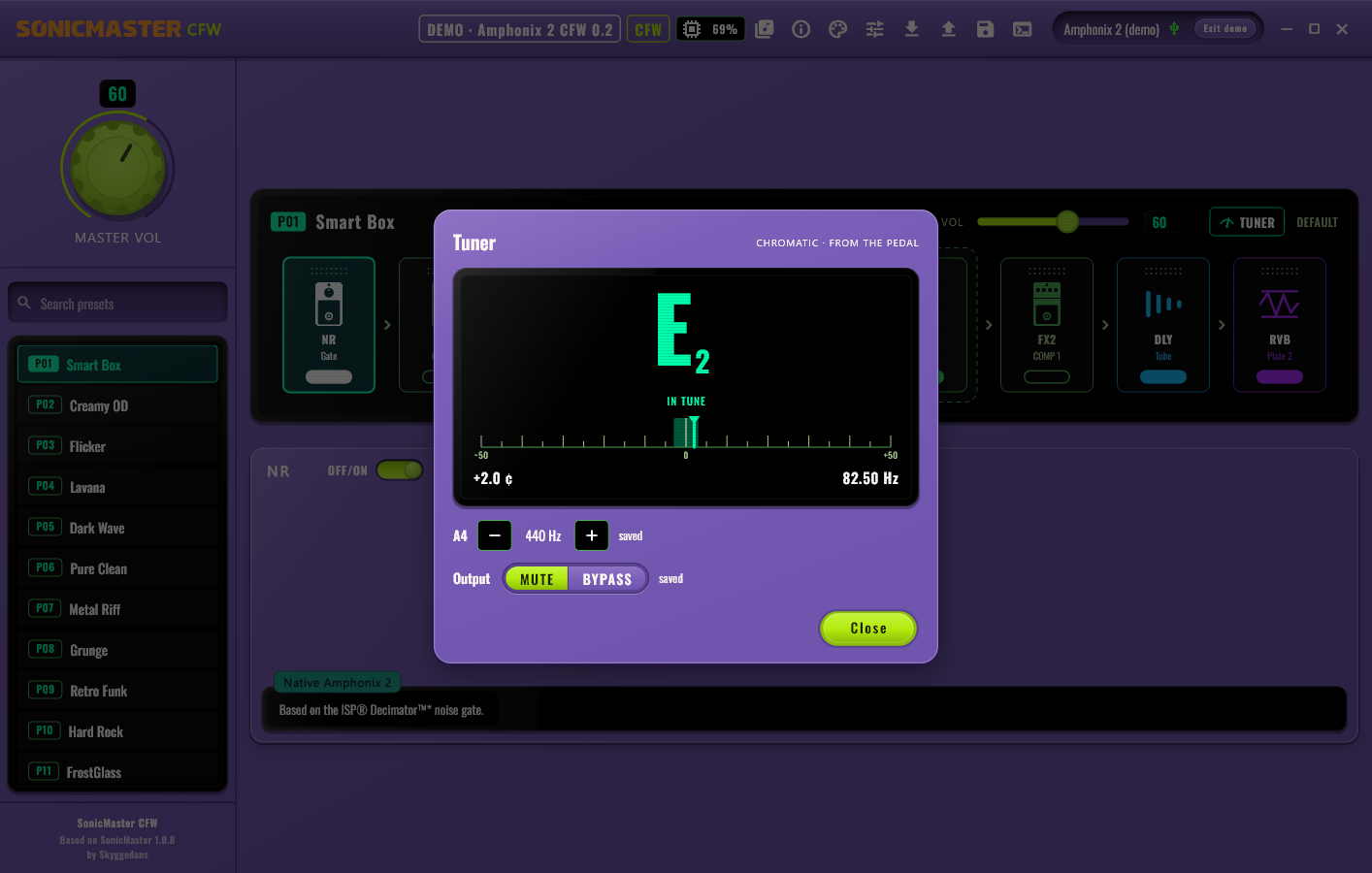
The tuner in the web app (also over USB), scenes (snapshots) on the
A / B / C keys, 3 or 5 presets per key, 10 + 10 IR and NAM slots with 30-character names, the IR after your
NAM capture, a DSP load meter and MIDI control, all on top of the official V1.0.2 firmware. From the makers of the Pocket
Master and Smart Box CFW: the same platform, flashed with Sonicake Manager like any update.
// status · test buildCFW 0.2 is in development. A test build runs on our own Amphonix 2, it is not released yet.
Nothing to download yet: the download and the release notes appear here with the first release.
At your own
risk. Unofficial, not affiliated with Sonicake. Flashing modified firmware can brick the unit
and void the warranty. No guarantee of any kind. Read the disclaimer.
✓ The original Amphonix 2 CFW
From the makers of the first custom firmware for Sonicake pedals (Pocket Master CFW, since
October 2026).
Downloads only from amphonix2-cfw.guitar-training-generator.com
Every .bin has its SHA-256 in the release notes: check it
The web app lives at pocketmaster-cfw.guitar-training-generator.com/app/
Building on it? Great, that's what a community is for. Just credit it and link this site.
Coming from the stock firmware? On the first boot the CFW keeps your
5 User IRs and 5 NAM captures and adds 5 more slots of each. Going back to the stock firmware later shows the
IR and NAM slots empty: back up first.
Illustrative drawing, not a photo, no logos.
// releases
News & releases
Every release is one file, for the first install and for every
later update. Newest first.
Loading releases…
News
CFW 0.2test build
We started cooking: the Amphonix 2
The official Amphonix 2 firmware V1.0.2 has been opened and
studied: it is a Pocket Master without screen and footswitches (the same firmware package, the same DSP
modules, its own builds). The SonicMaster CFW web app now recognises it as a third pedal, and a first CFW
0.2 test build is ready for the hardware test.
// features
What the CFW adds
Everything below runs on the unit itself, on top of the official
Sonicake V1.0.2 firmware. CFW 0.2 is a test build: the dashed badge means not released yet. Every card links
to its chapter in the user manual.
User manual
Every feature explained, on the unit and in the web app: installing, the A / B / C keys
and their LEDs, scenes (snapshots), the tuner, slots, MIDI, backup and going back, the FAQ.
Note, cents, Hz and A4 of the unit's own tuner, in the app, also over USB (the
original firmware tunes only over Bluetooth). A4 430–450 Hz and Mute / Bypass are saved; low bass
notes lock and read right (emulator result, to be confirmed on the unit).
Three sounds per preset, BASE, SC1 and SC2, with knobs and blocks
on / off, made in the web app. On the unit: hold the key of the preset for the next scene.
10 User IR and 10 NAM (Clone) slots instead of 5 + 5, names up to
30 characters. Your stock 5 + 5 are kept, with their names. An interrupted upload no longer spoils
the next one.
In a NAM preset, switch the IR block on: the factory cab or your User IR plays
after the capture. With the IR block off the capture plays alone, as before.
Two groups of blocks, FS1 and FS2, switched on and off together from a MIDI
controller (CC 80 / 81): on the Amphonix 2 the only way to switch them. A scene never switches a block of a
STOMP group.
The original firmware ignores MIDI. With the CFW, over USB and Bluetooth: choose
presets, switch blocks, the STOMP groups (CC 80 / 81) and the scenes (CC 82 / 83 / 85), open
the tuner and set the volume. The Stock map uses the Pocket Master CC numbers, so the Pocket
Control “Pocket Master” banks work.
50 presets, the Pocket Master models (without AC G), NAM captures and IRs, the drum
machine, Bluetooth audio, USB-C audio and recording, the battery: all kept as they are.
// keys
The A / B / C keys
The Amphonix 2 has no screen and no footswitches: its three keys
do the work. Choose the mode in the web app: Settings → A / B / C keys.
3 PRESETS (as stock)
Key
Each click
A
P01 → P02 → P03
B
P04 → P05 → P06
C
P07 → P08 → P09
The three LED colours of the original firmware.
5 PRESETS
Key
Each click
A
P01 → … → P05
B
P06 → … → P10
C
P11 → … → P15
The three stock colours, then two mixed ones.
Hold a key
On the key of the preset that plays: the next scene, BASE → SC1 → SC2 → BASE.
On another key: its preset, straight at SC1.
The key LED blinks 1 / 2 / 3 times for BASE / SC1 / SC2.
The editor in your browser, the same one as for the Pocket Master and the
Smart Box: it tells by itself which unit you connect. Nothing to install, or install it as an app.
Today: the Amphonix 2 with the stock firmware, its 50 presets and effects over USB-MIDI
or Bluetooth
With CFW 0.2: the tuner, the DSP meter, all 10 + 10 slots with
30-character names, the scenes (snapshots) editor, the STOMP groups, the A / B / C
keys setting and the MIDI settings with the Custom map editor
Converts .nam captures for the NAM slots, and works with TONE3000
Never offers a Pocket Master or Smart Box file to an Amphonix 2
The web app with a virtual Amphonix 2 CFW 0.2: the tuner (demo).
The app lives on the Pocket Master site: one app for all three units.
The Amphonix 2 CFW features come with the next web-app release.
// install
How to install
One file for the first install and for every update, flashed like
an official update. Not available yet: these are the steps for the first release.
Back up first
Make a backup in the web app (Backup & restore) and keep the files of your IRs and NAM
captures.
Flash with Sonicake Manager
Put the Amphonix 2 in update mode: unplug USB, then press and hold volume +, volume −
and the power key together until all lights are on. Then only the power key's LED stays on, white / light blue: that is update mode.
Plug USB back in, click Firmware
Update in Sonicake Manager, pick the CFW .bin and wait for the progress bar, as with
an official update. Windows 11: if the update stalls, give the update-mode device the “USB Audio
Device” driver.
First boot
The first boot takes a moment longer: the CFW moves your 5 User IRs and 5 NAM captures into
the new 10 + 10 slots. Your presets keep working.
Connect the web app
It shows Amphonix 2 CFW 0.2 and opens the new features.
Going back
Flash the official V1.0.2 the same way (update mode, Sonicake Manager). If an image
does not boot, the same steps (USB unplugged, the key combination, only the power LED lit) still enter update mode (it lives in the boot loader, not in
the firmware): re-flash the official V1.0.2. After going back the IR and NAM slots show empty (the data stays
in the unit: installing the CFW again brings them back).
// midi
MIDI control
The original firmware ignores every MIDI note and controller. With
CFW 0.2 the Amphonix 2 listens to CC, Program Change and notes over USB-MIDI and Bluetooth MIDI.
Presets: P01–P50 directly, bank ±10 and preset ±1 (both wrap around).
Blocks: NR … RVB on / off. STOMP FS1 / FS2 with CC 80 / 81: on the Amphonix 2
the only way to switch the groups.
Scenes (snapshots): CC 82 = SC1, CC 83 = SC2, CC 85 = BASE.
Tuner on / off (also over USB; it stays open until MIDI closes it) and the
volume: CC 7 master, CC 6 preset.
Maps: Stock (default: the Pocket Master CC numbers, so the Pocket Control “Pocket
Master” banks and other Pocket Master setups work), Generic (PC 1 = P01), Chocolate (PC 0 = P01) and Custom,
made in the web app and stored in the unit. A receive channel (ALL or 1–16).
Not on the Amphonix 2: tap tempo, looper, drum, knob roles, MIDI pedals
A–D, Global EQ. Every setting and the CC list: the MIDI chapter of the manual.
Disclaimer
⚠ At your own risk. We do NOT
guarantee that this firmware works on your unit. CFW 0.2 is a test build, tested on our own unit only. Sonicake
may have shipped hardware revisions we have never seen.
Unofficial community project. The Amphonix 2 custom firmware and SonicMaster CFW
are not affiliated with, authorised or endorsed by Sonicake.
Modifying the firmware of your device can brick it and may void your
warranty.
Everything here is provided "as is", without warranty of any kind, express or
implied. The author accepts no liability for damage to your device, loss of data (presets, IRs, NAM
captures) or any other loss arising from its use. Use it at your own risk.
Sonicake, Amphonix, Pocket Master, Smart Box and the other product names are trademarks
of their respective owners and are used here only to describe compatibility.
The firmware file is the official Sonicake firmware V1.0.2 with community
modifications: it contains Sonicake code, modified by the community.
// credits
Credits
SonicMasterby Andrii Klaptsov (MIT License): the base of the web app and of the NAM
conversion.
gp150-htfw: the HTFW firmware container specification.
TONE3000: the NAM and IR library the web app works with (Powered by TONE3000; not
affiliated with or endorsed by TONE3000).